Having trouble logging in?
If you had an account on our old website, good news — your email address and account details have been safely carried over to the new site.
For security reasons, you’ll just need to set a new password. Please use the Password Reset form with the same email address you used before, and you’ll be up and running in no time. See below for further instructions.
FAQ on updating your account password
- Is my account from the old website still valid?
Yes! Your details and account are still valid. To access the new customer account page you should login here with the email address you used to access the old website.
- How do I reset my password?
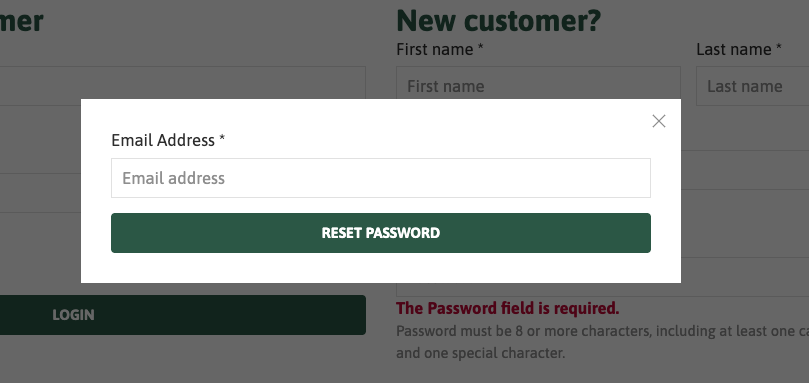
Click this link to go to the login page, from there under the 'Returning customer' form click the 'forgot password?' link as pictured on the screenshot below. Clicking this will open an overlay with a reset request email. Input your email into this and click the 'Reset Password' button.
You will be sent a reset email with a link, clicking this link will take you to another form where you can update your password. The reset email may take a few moments to arrive.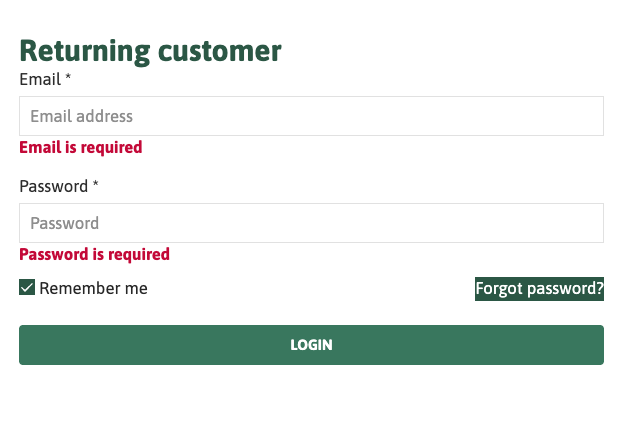
- My Password Reset Email hasn't arrived in my inbox
If you have followed the previous steps and cannot see the password reset email in your inbox, don't worry it may be either in your junk mail or spam folder or it could be being blocked.
Steps to take:
- Give it a bit of time: it can take a few minutes for the email to arrive.
- Add the email address ParkFarmOakley@mg.saledock.com to your trusted email senders.
- Check your junk mail or spam folder for the email.
- Check that email is not being blocked by a strict spam filter: If you have your spam filter set to high it may block system emails from the website and may never reach your inbox. Adding the above email to your contacts or safe list should resolve that but it's still worth checking.
If your email is arriving but you can't see the reset link contained within please follow the next step.
- I can see the email but I can't see the reset link in it.
Sometimes an email browser may ignore or change the styling of an email. If you compare the screenshots below you will see on one the link in blue while on the other it has been changed to white on white. If you swipe your selection across you can see the link is still there and it it is still clickable.
Example of email received in Gmail:

Example of email received in Outlook:

Example of email received in Outlook with content selected:
